zilleq
Active member
- Joined
- Sep 24, 2026
- Messages
- 34
- Reaction score
- 72
DeskCalc is professional desktop calculator software featuring a digital calculation tape, designed primarily for Windows; a simple, integrated version by the same name also exists for the Haiku OS operating system.
Unlike a conventional calculator, the main version of DeskCalc functions like the old-fashioned paper-tape adding machines, but adapted for a modern environment.
Key Features
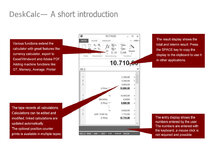
• Interactive calculation tape: Records every operation in a vertical list. You can go back to any previous line, modify a number or an operator, and the program will automatically recalculate the entire final result.
• Notes and comments: Allows you to add text or reminders next to each figure or calculation line—ideal for auditing accounts.
• Financial and accounting functions: Includes specialized tools for calculating taxes (such as VAT), percentages, costs, selling prices, and profit margins.
• Currency converter: Enables real-time currency conversions directly within the application.
• Data export: All transaction flows and calculations can be saved or exported directly to formats such as Microsoft Excel, Word, or PDF.
Homepage:
Unlike a conventional calculator, the main version of DeskCalc functions like the old-fashioned paper-tape adding machines, but adapted for a modern environment.
Key Features
• Interactive calculation tape: Records every operation in a vertical list. You can go back to any previous line, modify a number or an operator, and the program will automatically recalculate the entire final result.
• Notes and comments: Allows you to add text or reminders next to each figure or calculation line—ideal for auditing accounts.
• Financial and accounting functions: Includes specialized tools for calculating taxes (such as VAT), percentages, costs, selling prices, and profit margins.
• Currency converter: Enables real-time currency conversions directly within the application.
• Data export: All transaction flows and calculations can be saved or exported directly to formats such as Microsoft Excel, Word, or PDF.
Homepage:
Please,
Log in
to view URLs content!