zilleq
Well-known member
- Joined
- Sep 24, 2026
- Messages
- 50
- Reaction score
- 100
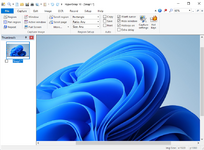
HyperSnap is a professional program for Windows operating systems, designed for advanced screen capture and image editing directly from the desktop. Developed by Hyperionics, it stands out for its ability to capture content that is difficult to record with basic tools—such as long web pages or full-screen video games.
Key Features
Diverse capture modes. Allows for capturing the entire screen, an active window, custom rectangular regions, or freehand shapes.
Scrolling capture. Makes it easy to create a single, continuous image of extensive documents or web pages that require vertical or horizontal scrolling.
Support for video games and multimedia. Capable of capturing frames from games and applications running in DirectX, Direct3D, or Glide video modes—environments where standard capture methods often fail.
Optical Character Recognition (OCR). Includes a feature to extract editable text directly from images or areas of the screen where conventional copy-and-paste is not possible.
Integrated image editor. Provides tools for cropping, resizing, and adding elements such as arrows, text boxes, highlights, frames, and visual effects (e.g., blur or mosaic)—all without needing to open a separate program.
Common Use Cases
This software is frequently used in technical writing, software development, education, and content creation. It is particularly useful for producing user manuals, step-by-step tutorials, presentations, and bug reports for applications.
Homepage:
Key Features
Diverse capture modes. Allows for capturing the entire screen, an active window, custom rectangular regions, or freehand shapes.
Scrolling capture. Makes it easy to create a single, continuous image of extensive documents or web pages that require vertical or horizontal scrolling.
Support for video games and multimedia. Capable of capturing frames from games and applications running in DirectX, Direct3D, or Glide video modes—environments where standard capture methods often fail.
Optical Character Recognition (OCR). Includes a feature to extract editable text directly from images or areas of the screen where conventional copy-and-paste is not possible.
Integrated image editor. Provides tools for cropping, resizing, and adding elements such as arrows, text boxes, highlights, frames, and visual effects (e.g., blur or mosaic)—all without needing to open a separate program.
Common Use Cases
This software is frequently used in technical writing, software development, education, and content creation. It is particularly useful for producing user manuals, step-by-step tutorials, presentations, and bug reports for applications.
Homepage:
Please,
Log in
to view URLs content!