

zilleq
Member
- Joined
- Sep 24, 2026
- Messages
- 14
- Reaction score
- 24
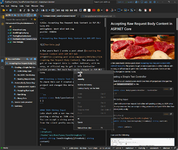
Markdown Monster is a powerful, extensible, and user-friendly Markdown editor and viewer designed specifically for the Windows operating system. Developed by West Wind Technologies, this tool targets both developers and content creators seeking an efficient solution for project documentation, article writing, and rich text editing using plain code.
Key Features
• Real-time preview: Features a split-pane view that displays the rendered HTML output in sync as you type or scroll through the document.
• Advanced image management: Allows for streamlined image integration via drag-and-drop from the file explorer, direct clipboard pasting, native screen capture, or smart dialog boxes.
• Syntax highlighting and sophisticated editing: Facilitates writing with built-in tools to quickly insert code blocks, links, quotes, and tables using keyboard shortcuts or toolbars.
• Weblog publishing: Enables exporting and publishing posts directly from the application to compatible blogging platforms.
• Integrated file browser: Includes a side-panel folder explorer to quickly manage your documentation project structure and files without leaving the editor.
• Extensibility and add-ins: Built on .NET, it supports the creation and use of add-ins to extend functionality—such as Azure integration, scripting, GitHub Gist publishing, and AI support.
• Text utilities: Incorporates an inline spell checker and a real-time word count to optimize content quality while writing.
• Git integration: Includes status tools to visualize changes and perform commits directly within your version control repositories.

Homepage:
Mediafire (24 MB):
Key Features
• Real-time preview: Features a split-pane view that displays the rendered HTML output in sync as you type or scroll through the document.
• Advanced image management: Allows for streamlined image integration via drag-and-drop from the file explorer, direct clipboard pasting, native screen capture, or smart dialog boxes.
• Syntax highlighting and sophisticated editing: Facilitates writing with built-in tools to quickly insert code blocks, links, quotes, and tables using keyboard shortcuts or toolbars.
• Weblog publishing: Enables exporting and publishing posts directly from the application to compatible blogging platforms.
• Integrated file browser: Includes a side-panel folder explorer to quickly manage your documentation project structure and files without leaving the editor.
• Extensibility and add-ins: Built on .NET, it supports the creation and use of add-ins to extend functionality—such as Azure integration, scripting, GitHub Gist publishing, and AI support.
• Text utilities: Incorporates an inline spell checker and a real-time word count to optimize content quality while writing.
• Git integration: Includes status tools to visualize changes and perform commits directly within your version control repositories.
Homepage:
Please,
Log in
to view URLs content!
Mediafire (24 MB):