

zilleq
Member
- Joined
- Sep 24, 2026
- Messages
- 14
- Reaction score
- 24
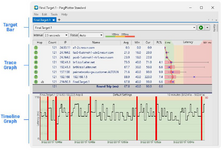
PingPlotter Professional is an advanced tool for network diagnostics, troubleshooting, and graphical monitoring. Unlike traditional text-based commands, this software combines ping, traceroute, and whois functions to continuously gather connectivity data and visualize real-time network performance—hop by hop—between a device and a final destination.
The Professional edition is specifically designed for system administrators, Internet Service Providers (ISPs), VoIP engineers, and IT professionals who require enterprise-grade capabilities to identify bottlenecks and intermittent outages in complex environments.
Key Features
• Simultaneous multi-target monitoring: Tracks latency and packet loss for 250 to 500+ targets in parallel from a single interface, making it ideal for monitoring large-scale infrastructures.
• Advanced metrics for VoIP and streaming: Beyond standard latency and packet loss measurements, it calculates critical audio and video quality metrics such as Jitter (latency variation) and MOS (Mean Opinion Score).
• Historical timeline charts: Records network behavior 24/7, allowing for the analysis of visual summaries spanning the last few minutes, hours, or days. This makes it easy to objectively demonstrate when and where intermittent outages occurred.
• Runs as a Windows Service: Can be configured to run in the background as a system service. This ensures continuous metric data collection even when no user is logged into the computer.
• Integrated Web UI: Features a built-in native web server, enabling administrators to remotely access the dashboard, manage targets, and review charts via any modern web browser.
• Smart alerts and automation: Supports the configuration of automated notifications (such as emails or event logs) triggered by changes in network conditions. It also includes a REST API and Webhooks for integration with external systems.
• Local network discovery: Includes automated tools to scan and map devices connected to the same local network (LAN or Wi-Fi), facilitating the detection of internal conflicts before traffic reaches the internet.

MEDIAFIRE (40 MB):
Homepage:
The Professional edition is specifically designed for system administrators, Internet Service Providers (ISPs), VoIP engineers, and IT professionals who require enterprise-grade capabilities to identify bottlenecks and intermittent outages in complex environments.
Key Features
• Simultaneous multi-target monitoring: Tracks latency and packet loss for 250 to 500+ targets in parallel from a single interface, making it ideal for monitoring large-scale infrastructures.
• Advanced metrics for VoIP and streaming: Beyond standard latency and packet loss measurements, it calculates critical audio and video quality metrics such as Jitter (latency variation) and MOS (Mean Opinion Score).
• Historical timeline charts: Records network behavior 24/7, allowing for the analysis of visual summaries spanning the last few minutes, hours, or days. This makes it easy to objectively demonstrate when and where intermittent outages occurred.
• Runs as a Windows Service: Can be configured to run in the background as a system service. This ensures continuous metric data collection even when no user is logged into the computer.
• Integrated Web UI: Features a built-in native web server, enabling administrators to remotely access the dashboard, manage targets, and review charts via any modern web browser.
• Smart alerts and automation: Supports the configuration of automated notifications (such as emails or event logs) triggered by changes in network conditions. It also includes a REST API and Webhooks for integration with external systems.
• Local network discovery: Includes automated tools to scan and map devices connected to the same local network (LAN or Wi-Fi), facilitating the detection of internal conflicts before traffic reaches the internet.
MEDIAFIRE (40 MB):
Homepage:
Please,
Log in
to view URLs content!
Last edited: