What's new
RevTeam.Re - Reverse Engineering Team

Welcome Guest! Register a free account today to become a member! Once signed in, you'll be able to participate on this site by adding your own topics and posts, as well as connect with other members through your own private inbox! Register and wait for our approve!

Video Repair Tool V1.40

hanalog

Well-known member
Joined
Jan 19, 2024
Messages
93
Reaction score
192
Program Name and Version :

Code:
Video Repair Tool V1.40

Program Link ( Employee ) :
Code:
Please, Log in to view URLs content!
2024-01-22_233209.png

Language written:
Code:
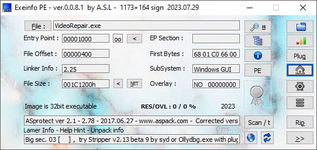
ASprotect ver 2.1 - 2.78 - 2017.06.27 -
Please, Log in to view URLs content!
- Corrected version detect only : ASPrINFO v 1.6 Beta by nik0g0r 2oo7
2024-01-22_233300.png

Restrictions :
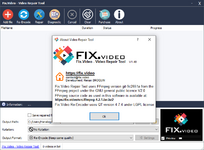
Code:
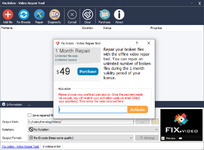
We cannot export repaired option
Adding watermark etc. Registration limit.
2024-01-22_233226.png

File Size ( MB ) :
Code:
48,9MB

Description ( Brief information about the program ) :
Code:
Can run on Windows 10 to Windows 11 only
 

Teamo

Member
Joined
Jan 14, 2024
Messages
5
Reaction score
2
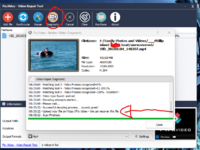
Interesting piece of software. Tried repairing a corrupted mp4 in demo mode .

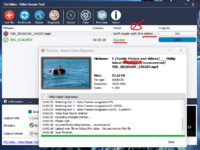
When running the Diagnostic is says it was able to find 100% of the frames and plays a snippet of the video (not just a static frame).

It also directs you to the website to upload and have the video fixed online in the Diagnostic text

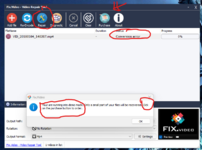
Then if trying to Repairing the same video in this demo program after the Diagnostic, it shows a Conversion error (without trying to go through repair process)

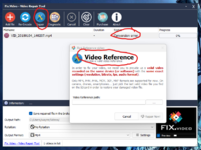
And finally asks for a sample of a playable reference video from the same camera/device.

It's quite normal for some of these programs to ask for a reference sample, but in this case the Diagnostic showed it was able to find 100% of the frames. Which in theory should be able to be repaired without the sample.

edit: I just tried the demo software with a video that has no issues and plays fine in VLC media player. It played in the the Video Repair Tool when running the Diagnostic, but then asked for a reference sample when pressing the Repair button.

Screenshot 2024-01-25 063905.png

Screenshot 2024-01-25 071433.png


Screenshot 2024-01-25 065429.png
 
Last edited:

Teamo

Member
Joined
Jan 14, 2024
Messages
5
Reaction score
2
First (VID_20180104_140207.mp4) was the corrupted video that passed the Diagnostic Test, finding all frames, But says it 'can't repair with this reference' after the Repair button was pressed.

Second (IMG_1638.MOV) was a working video with no corruption to see what the program would do. It re-encoded the working video when the repair button was pressed in full resolution.

Tested other corrupted videos (MP4 & MOV) and got the same can't repair message.

If its going to help I can message you a download link to the currupted video and a full working reference video taken on the same camera (same day) to test on the go - about 60meg.

Screenshot 2024-01-26 190320.png
 
Last edited:
  • Like
Reactions: jam

pamelax

Well-known member
Joined
Sep 19, 2021
Messages
118
Reaction score
95
But why the video is needed to be uploaded to their site to recover?it's useless without connection.
 
D

davisjenny

Guest
checking it out now, thanks. I also found another great tool.
Please, Log in to view URLs content!
is a straightforward and free tool designed to make MP4 file repair simple and hassle-free. If you’re dealing with a corrupted video, all you need to do is upload the file to their platform, and the tool takes care of everything else. It’s an excellent option for those looking for a quick, cost-free solution that doesn’t require downloading or installing any software
 
Last edited by a moderator:
Top